
Help Centre › Appointments & queues
Advanced vet scheduling
Rotations, alternate weeks, locums and split days — the working patterns that are not simply the same hours every week.
Most vets work the same hours every week, and Vet Availability handles that in a minute: pick the vet, type the hours, done. This page is for the ones who do not — the fortnightly swap, the week on and week off, the locum who is in three Tuesdays a quarter.
Vets who rotate#
One week Dr Adams takes the mornings and Dr Bello the afternoons; the next week they swap. Set that up once and it repeats on its own — you never enter it again, and it never runs out.
Home›Settings›Vet Availability
On the vet's card, change Same hours every week to Hours rotate over and choose how many weeks the rotation runs over. The week grid then grows a tab for each week, and you fill in each one separately.
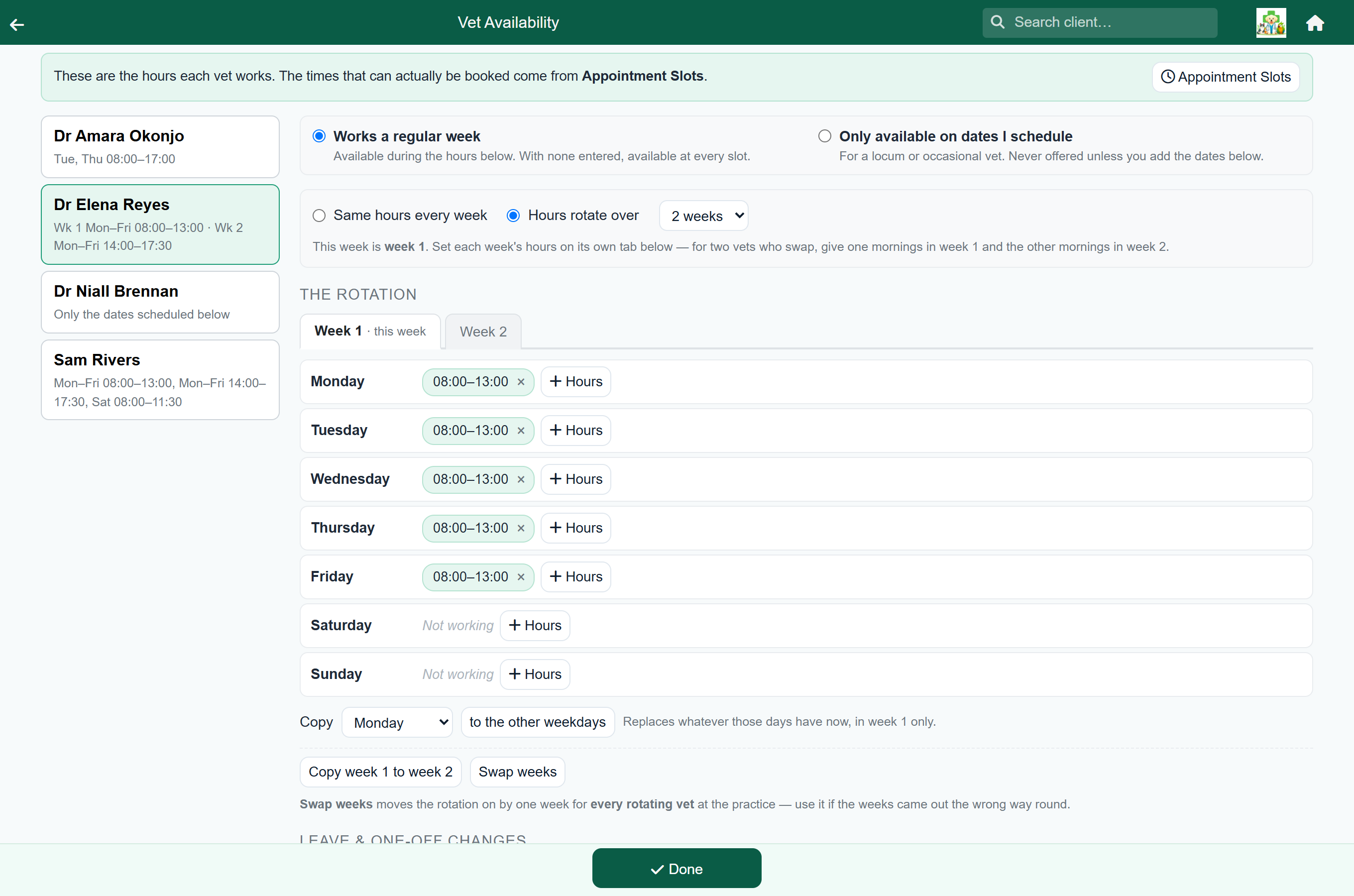
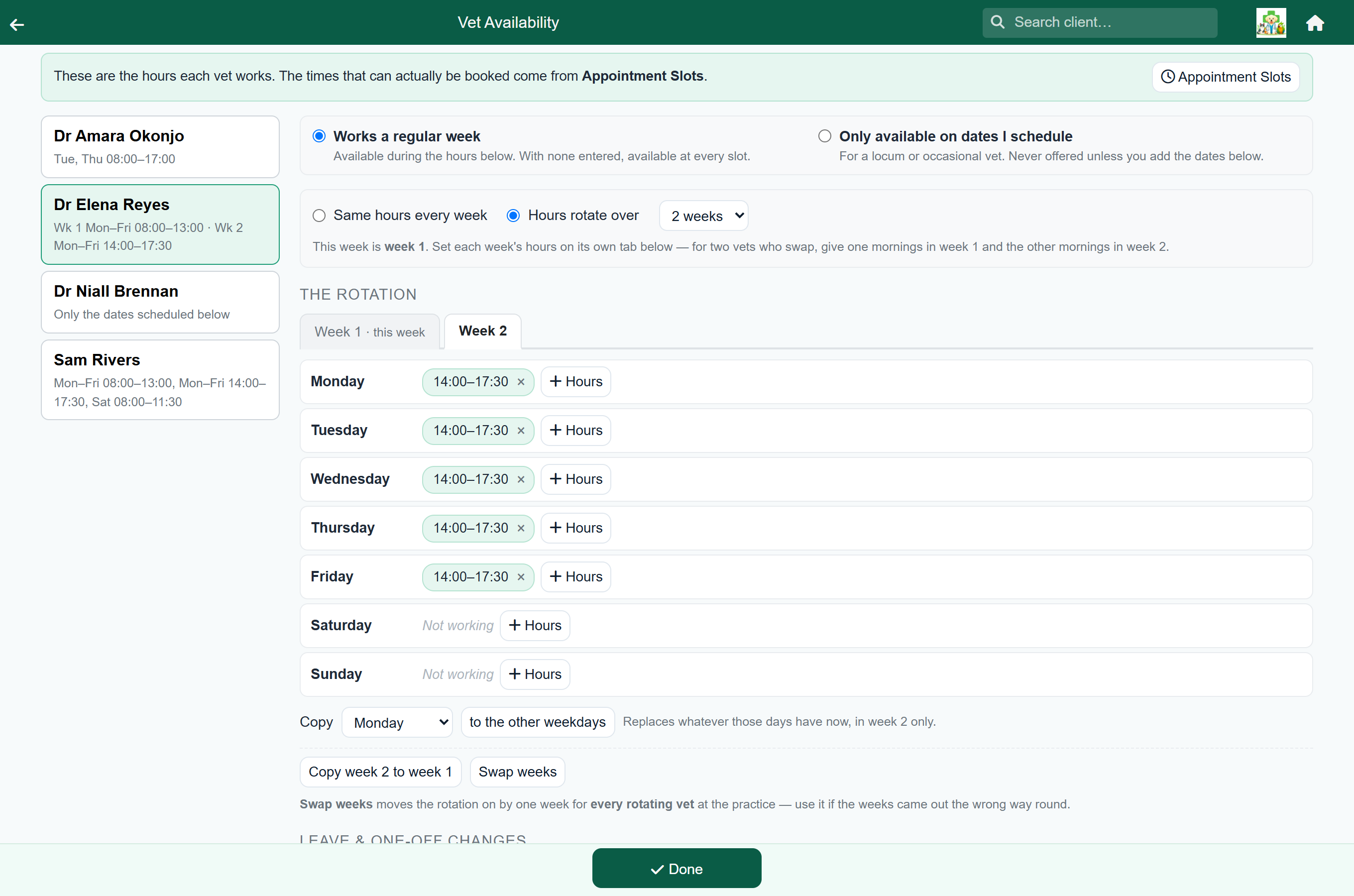
To build the swap described above:
- On Dr Adams, choose Hours rotate over 2 weeks.
- On the Week 1 tab, add the morning hours to one day, then use Copy to put them across the other weekdays.
- Press Copy week 1 to week 2. The screen switches to week 2 with the same hours in it.
- Change those to the afternoon hours — again, one day then Copy.
- Now do Dr Bello the other way round: afternoons in week 1, mornings in week 2.
A week on, a week off#
Someone who works one week in two is the same mechanism with one tab left empty. Put them on a two-week rotation, enter their hours on the Week 1 tab, and leave Week 2 as it comes — every day saying Not working.
In their off week the diary treats them as not in, and reception gets a note that says which week it is rather than claiming they never work that day:
"Dr Adams is not on the rota this Monday — this is week 2 of 2. They work Mondays in week 1."
Hours that do not rotate#
A rotating vet usually has something fixed in among it — a Saturday morning clinic they do whatever week it is. Those hours do not need entering on every tab.
When you add them, tick Every week. They then show on every tab, greyed, with an every week label, so you can see they apply without being able to change them into one week by mistake.
Rotations longer than a fortnight#
A rotation can run over two, three or four weeks. A three-week rota might be mornings, then afternoons, then a week off; a four-week one might put a vet on Saturdays once a month.
It works exactly as the two-week case does — there are simply more tabs. Everything else is the same: one tab is marked this week, Copy stays inside the tab you are on, and Copy week 1 to week 3 and friends appear for whichever weeks exist.
When the weeks come out the wrong way round#
It is an easy thing to get backwards: everyone is entered correctly, but the whole rotation is one week out, so this week the system thinks Dr Adams is on afternoons when she is plainly on mornings.
Press Swap weeks. The rotation moves on by one week and everything lines up.
Locums and occasional vets#
A locum has no weekly pattern to enter at all, which needs the opposite treatment from everything above. Rather than describing a repeating week, you switch them to Only available on dates I schedule and then add the days they are actually in.
| Setting | What it means |
|---|---|
| Works a regular week | The hours entered below apply. With none entered at all, the vet is available at every slot — right for a salaried vet whose hours nobody has typed in yet. |
| Only available on dates I schedule | Never offered unless a date below says otherwise. Right for a locum, a visiting specialist, or a semi-retired partner. |
Their dates go in under Leave & one-off changes using Add an extra session — the same list that holds everyone's leave, used in the other direction.
Leave, courses and one-off changes#
Dated changes sit underneath the week grid and are unaffected by any of the above. They win over a rotation, in both directions:
- Leave or a block takes the vet out on that date whichever week of the rotation it falls in.
- An extra session puts them in on that date — including in a week they would normally be off, which is exactly how "I'm not on this week, but I'll come in for the Tuesday afternoon" is entered.
Reception sees the reason you typed, so "CPD — small animal dentistry" is more use on the day than "leave".
Changing or undoing a rotation#
Nothing here is a one-way door.
- Switching a vet back to Same hours every week keeps every set of hours you entered — they simply all apply again, in every week. Nothing is deleted, so it is safe to try a rotation and change your mind.
- Turning a rotation on does not disturb the hours already entered either. They carry on applying in every week until you split them across the tabs.
- Copy and Copy week 1 to week 2 only ever touch the week they name, so tidying one week cannot quietly empty another.
Patterns FastVet cannot describe#
Rotations are counted in whole weeks, anchored to a Monday. Some real rotas are not, and it is better to know now than to discover it half way through setting one up:
- Cycles that are not whole weeks — four days on, four days off, or a ten-day rota. These drift across the days of the week, so no number of week tabs describes them.
- Rotas longer than four weeks.
- Rotations that step around public holidays rather than rolling straight through them.
For those, leave the vet on ordinary weekly hours — or a rotation that is right most of the time — and use Leave & one-off changes for the dates that depart from it. It is more typing, but the diary stays truthful, which is the thing that matters.